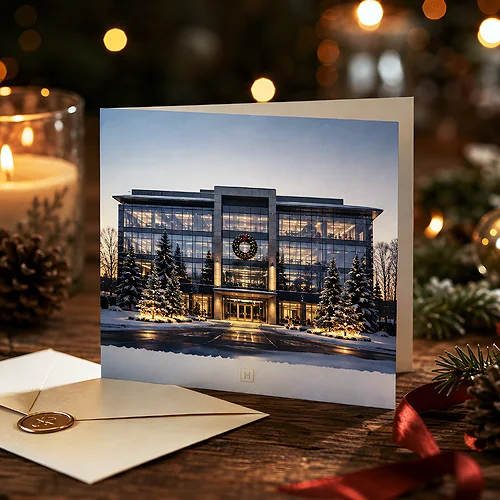
There is a moment just after sunset when the sky turns deep navy and the lights in the windows begin to glow warmly. Capture your headquarters then - with a cap of snow on the roof and a string of lights above the entrance - and an ordinary photo turns into a ready-made Christmas card. A real photograph carries an authenticity that no illustration can fake.
A photo of your own headquarters is one of the most personal motifs for a company Christmas card. It shows a real place, not an imagined one - the recipient recognises a building they know and immediately knows who sent the wishes. The trick is to make the photograph look natural and elegant, rather than like a CCTV still with snow pasted on top.
In this post we walk through the whole path: from choosing the time of day and the frame, through subtly adding winter accents, to preparing the file for print so the colours on paper look as good as they do on screen. No artifice, no overkill - with the focus on what makes the difference.
- A real photo of your headquarters is authentic and personal - the recipient recognises a place they know.
- The best time is the blue hour just after sunset: a navy sky and warm windows create a festive contrast.
- Frame the shot slightly from the side, with breathing space around the building - it shows the form and leaves room for wishes.
- Add winter accents with restraint: natural snow and lights look better than heavy, artificial editing.
- Before printing, check the colours and resolution - what glows on screen looks different on paper.
Why a real photo makes a difference
An illustration gives control over every detail, but a photograph has something you cannot draw - truth. When the recipient sees a real building, with real light and snow, the card gains credibility. It is not an imagined scene, but "our place on a festive evening". This sense of closeness fits perfectly into the role of a company card as a relationship-building tool - you show a piece of your everyday life, and that brings people closer.
There is one condition: the photo must be taken deliberately. A random snapshot in full sun, with cars in the foreground and flat light, will not convey the mood. The good news is that you do not need professional gear - you need the right time of day, a calm frame and a few thoughtful adjustments.
Choosing the shot and the time of day
When and how you take the photo decides everything. The same headquarters at noon and at dusk are two completely different cards.
The blue hour - the best moment
The blue hour is the short time just after sunset, when the sky is still navy but not yet fully black. It is the best moment to photograph a building, because:
- the warm light from windows and lamps contrasts beautifully with the cool sky,
- the navy background immediately builds an evening, festive mood,
- the soft light smooths out details and hides what distracts during the day.
If the building has striking glazing or lit interiors, this moment shows them at their best. An alternative is the golden hour just before sunset, when everything is bathed in warm, honey-coloured light - also a very flattering time.
A frame that shows character
Position yourself slightly from the side rather than head-on - an angled shot shows the form of the building and looks livelier. Leave some space around the headquarters: a bit of sky above the roof and some foreground at the bottom. That "empty" space will come in useful later for the wishes and the logo. If the surroundings are built-up, move closer and frame just the entrance with its lights - sometimes a fragment says more than the whole facade.
Take a series of photos over a dozen or so minutes around sunset - the sky changes from minute to minute. Later, at your leisure, you can pick the frame with the perfect balance of warm windows and navy sky. One good moment can pass very quickly, so it is better to have plenty to choose from.
Subtly adding winter - snow and lights
Snow does not always fall on cue, and lights are not always up exactly when you take the photo. Winter accents can be added at the editing stage - the condition is restraint. Naturalness comes from subtlety:
- Snow - a thin layer on the roof and windowsills looks believable; thick, fairy-tale drifts less so. Add it where snow would actually settle.
- Falling snow - delicate, blurred flakes add movement, but a dense blizzard will cover the building. A few layers of different sizes look the most natural.
- Lights - a warm string above the entrance or an outline of the windows should have a real glow and a slight halo. Points that are too bright immediately give away the editing.
The rule is simple: add as much as real winter would, and not a scrap more. If, after the edits, someone could believe it simply was like that that evening - you have hit it perfectly.
Consistency with the festive layout and logo
The photo is the foundation, but the card is made by the whole. The photograph has to work together with the wishes, the logo and the company colours. It is worth leaving a calm area in the photo - navy sky or snow in the foreground - where you will place the wishes in a legible typeface. Position the logo discreetly, in a corner or beneath the text, so it does not fight with the photograph. We wrote about how to balance these elements in our post on designing an elegant card with a company logo.
Match the colours of the text and background to the dominant tone of the photo - white and a gentle blue play beautifully with a navy sky, while warm ivory suits the honey light of the golden hour. The point is for the wishes to look like part of the scene, not a sticker on top.
Preparing the photo for print
The biggest disappointment is the moment when a beautiful, glowing photo from the screen comes out of the printer dark and muted. This is normal - a screen shines with its own light, while paper only reflects the light that falls on it from outside. That is why it is worth knowing in advance why colours in print differ from those on a monitor, and preparing the file with paper in mind.
In practice, it is worth taking care of a few things:
- Brightness - lighten dark, evening photos a little more than they seem to need on screen; print usually dims them.
- Resolution - use a high-resolution photo so the building's details are sharp rather than blurred on paper.
- Frame with a margin - leave a margin around the most important elements, so nothing important disappears when the card is trimmed.
Before you approve the design, go through it calmly point by point - our pre-print checklist will help. A few minutes of checking saves the disappointment after the parcel arrives.
A photo of your headquarters in a festive setting is a card that combines authenticity with elegance - provided it is created deliberately. Catch the blue hour, set up a calm frame, add winter with restraint and prepare the file with paper in mind. The result is a company Christmas card on which your place looks exactly the way you would want clients to remember it - warm, calm and with class.