
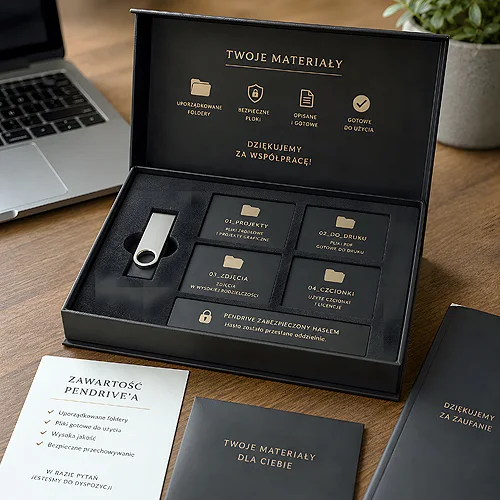
A flash drive with finished materials for a client is the moment when all your company's work lands in one pair of hands - and it either makes the impression of an organised whole or of digital clutter. A client who plugs in the drive and sees thirty files named "final_v2_ultimate_THIS_ONE" will remember that more than many a presentation. That is why the contents of the drive deserve to be treated as seriously as the product itself.
The good news is that organising materials does not require special tools or many hours. It requires one simple scheme that you follow consistently on every job. Below we show how to build such a scheme - from the folder structure, through file naming, to securing the data and finishing the drive itself with a professional touch.
- Set one repeatable folder layout - the client should know at a glance where to find what.
- Name files logically: company name, material type, version, date - no "final_final".
- Add a short "Read me" file or a table of contents that explains what is inside.
- Secure the data: keep a backup yourself, use formats that open without exotic software, optionally password-protect sensitive files.
- Look after the physical layer - a labelled, branded drive in a tidy package rounds off the impression of professionalism.
Start with the folder structure
The first thing a client sees after plugging in the drive is the main directory. If all the files spill onto it at once, the impression is the same as a cluttered desk. Instead, plan a clear structure that you replicate on every job.
The simplest approach is to split the contents into a few main folders matching material types. The client does not need to know your internal logic - the folders should speak for themselves.
- 01_For print - production files as PDF, ready to send to the printer or the archive.
- 02_For the web - graphics in a screen version, for social media, the website, in a smaller resolution.
- 03_Sources - open, editable files, if the contract provides for handing them over.
- 04_Logo and identity - the brand book, logo variants, the colour palette, fonts.
- 05_Previews - light JPGs for a quick look without opening heavy files.
Numbering folders with a digit at the start means the system always arranges them in the same order, rather than alphabetically by a random name. A small thing that instantly raises the sense of order.
Build yourself one empty "folder template" and keep it on your disk. On every new job you copy the structure and fill it with files, instead of creating the layout from scratch. After a few projects clients will start recognising your order as a hallmark of the company.
File naming that needs no explanation
A file name is the shortest form of communication with the client. A good name says everything without opening - who the file concerns, what it contains and which version it is. A bad name forces clicking through one by one to guess what is what.
A proven scheme is: client-name_material-type_version_date. For example "LotosCafe_leaflet-A5_v2_2026-10-10". Stick to a few simple rules and the names will sort themselves out.
- No accented characters or spaces - use underscores or hyphens so the name does not break on another system.
- Number versions with digits - v1, v2, v3, not "revised", "final", "really_final".
- Date in year-month-day format - so the files line up chronologically on their own.
- One final version - if you are handing over a finished piece, remove the working versions from the folder so the client does not accidentally open an old one.
Consistency matters here more than the scheme itself. Even a simple naming system, used every time, makes your materials look like they were prepared by a company that knows what it is doing.
Add a guide to the contents
Even the best-arranged folders gain when you add a short description. A text file or a one-page PDF named "Read_me" or "Table_of_contents" saves the client guesswork and phone calls with questions.
It does not have to be an essay. A few sentences are enough: what is in which folder, which files are ready for print and which for the web, and how to reach you with questions. If you are handing over source files, note which program opens them. Such a small thing builds trust - it shows that you think about the recipient's convenience, not just about ticking off the job.
A format that will open for anyone
Before you upload the materials, think about what the client will open them with. A file in an exotic format that needs paid software is useless from their perspective. For previews and final versions use universal formats - PDF for documents and print files, JPG or PNG for screen graphics. Leave source files in graphics programs in a separate folder and clearly mark them as material for a designer, not for everyday use. If you are preparing anything for further printing, it is worth looking at our file preparation guide so the PDFs you hand over meet production requirements from the start.
Data security and a backup
A flash drive is a convenient medium, but also easy to lose and prone to failure. Before you hand it to a client, make sure the data does not exist in this one place alone. It is a matter of professional hygiene that often saves a relationship.
- Always keep a copy - let the full set of materials sit with you on a disk or in an archive. If the client loses the drive, you will prepare a new one in minutes.
- Check the drive before handing it over - plug it into another computer and make sure all the files open and nothing got damaged during copying.
- Protect sensitive data with a password - if the drive holds confidential materials, consider packing them into a password-protected archive, passing the password to the client through a separate channel.
- Do not leave junk behind - remove temporary files, hidden system directories and stray copies that sometimes travel along with a folder.
The same applies to the substantive content. If you are wondering what is even worth putting on a company drive beyond the job files themselves, a good starting point is the post on what to record on a company flash drive to interest a client. Well-chosen extra content can turn an ordinary file handover into a pleasant touch that builds the relationship.
The physical layer - the drive and packaging
Organised files are half the impression. The other half is the object the client holds in their hand. A nameless, random drive found in a drawer sends a completely different message than a tidy, labelled medium in a neat package.
It is worth reaching for branded flash drives with print, on which you place the company logo and contact details. Such a drive not only looks professional at the moment of handover, but also stays with the client for longer and reminds them of you every time they reach for the data. Choose the model to suit the character of the brand - one will work in a technology firm, another in a creative studio or a law office. In a law office or a consultancy a natural fit is the metal Unity with engraving, in a creative studio the Colour with full colour UV print, while the Twister stays the universal choice.
- Upload and check the materials - copy the files in the target structure and verify that everything opens.
- Label the drive - print with a logo or at least a sticker with the project name, so the drive does not get lost among others.
- Secure the packaging - a simple, branded case or box protects the drive and rounds off a coherent image.
- Include your contact - a business card or a short note with details makes it easier for the client to return to you with the next job.
If handing over the materials is part of a larger whole - a gift, say, or an elegant delivery - it is worth thinking about packaging matched to the occasion too. If in doubt about how to combine the drive, the labels and the finish into a coherent whole, simply write to us and we will suggest a solution for your case.
An organised flash drive takes no more effort than a mess - it just requires one good scheme applied consistently. Set the folder structure, stick to logical names, add a short guide and look after the physical layer. The client will remember the company that hands over materials ready to use straight away, and that memory will come back with the next order.


