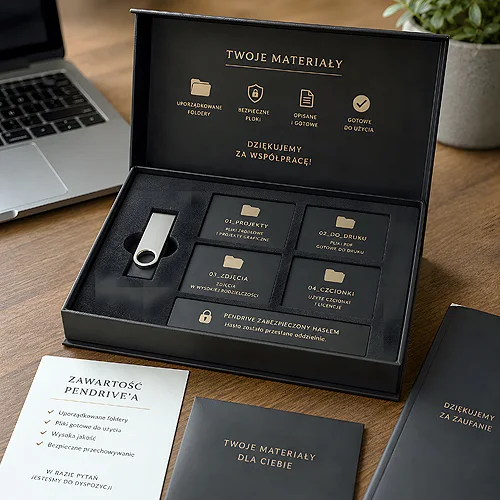
Sending a link to a cloud folder is often the easiest thing we can do - but not always the most convincing. A USB drive with a ready company portfolio works differently: it is a concrete, physical object that a client picks up, plugs into a laptop and views when they genuinely have the time. In this article we show which industries benefit most from this approach and how to prepare the drive so it makes a good impression.
- A USB portfolio is a professional way to present your offer and work - it acts like a business card that carries the whole content with it.
- It works best where file quality and first impressions matter: photography, film, architecture, design, real estate.
- It is worth organising the content into folders, adding a short starter file and consistent company materials.
- Personalisation - a logo on the casing and elegant packaging - builds a professional impression the moment it is handed over.
Why a USB drive rather than just a link
A cloud link is convenient, but it has its weaknesses. It needs an internet connection, it can be accidentally deleted from an email, and large files - visualisations, photo sessions, videos - can load endlessly. A USB drive solves this in one move: everything is right there, in the highest quality, ready to view straight away.
There is also a second, less obvious difference. A physical drive stays. A link disappears in an inbox, while a USB drive with your company logo sits on a desk, in a drawer, in a laptop bag - and quietly reminds people of your brand. It is a small gesture that communicates: "we prepared this especially for you".
A good portfolio does not have to shout. Sometimes it is enough that it reaches the client at the right moment and in the right form.
Which industries benefit most
A USB portfolio works almost anywhere the result of your work is better shown than described in words. A few industries stand out in particular.
Photographers and filmmakers
This is a natural environment for a USB drive. Full-resolution photo sessions, video material, a showreel - these are files that can be cumbersome in the cloud, but reveal their full quality on a drive. The client views them on a large screen, without compression and without waiting.
Architects and interior designers
3D visualisations, floor plans, a portfolio of completed projects - all in one place, organised and ready to present at a meeting. A USB drive also pairs well with printed material, for example an elegant company folder in which you hand over the complete offer.
Creative agencies and designers
A portfolio of campaigns, graphic projects, animations. Here the drive itself is part of the message - if you work in creative, a consistent, well-designed USB drive with a logo shows that you care about detail in your own house too.
Construction and finishing trades
"Before and after" photos of completed work, a catalogue of services, references. A client planning a renovation or build will happily browse a portfolio of finished projects - and a solid drive suits the image of a company that finishes what it starts.
Real estate
Listings of flats and commercial units with a full gallery of photos, plans and descriptions. A drive handed over during a viewing stays with a potential buyer longer than an ordinary link - and with a larger investment, this form simply looks more serious.
Artists and makers
A catalogue of work, photos of collections, the story behind the craft. For someone selling something unique, the form of presentation matters as much as the content itself.
Consultants and trainers
Training materials, presentations, e-books, workshop recordings - all gathered in one place and given to a participant as part of a pack. This fits the idea of a USB drive in a welcome kit, which we discussed separately.
What to put on the drive and how to organise it
A drive full of chaotically dropped files makes the opposite impression to the one intended. It is worth taking a moment for order - it shows from the very first click.
- A short starter file - a one-page "where to begin" or a simple welcome screen that guides through the content.
- The portfolio in themed folders - divided by type of project, year or industry, so the client quickly finds what interests them.
- Offer and service list - in a clear PDF, visually consistent with the rest of the materials.
- Contact details - in a visible place, ideally also as a business card file.
- References or reviews - a few selected ones, if you have them.
Name your files and folders the way a client would - "Projects 2025", not "IMG_final_v3_final". A clear structure is part of a professional impression.
Personalisation - the detail that builds a professional impression
The drive itself can be refined so it becomes an extension of the brand. A logo on the casing is the basis - the drive stops being an anonymous gadget and becomes part of the company identity. The Twister USB drive with a swivel casing works well as a classic printed drive, while the Click USB drive is a simple slide-out form without a removable cap, which is hard to lose.
The second element is packaging. A drive handed over in an elegant box or together with a printed offer pack makes a completely different impression than one pulled loose from a pocket. If you are building a consistent set, it is worth thinking about printed materials from the same visual family.
Aim for consistency: the logo on the drive, the packaging colours and the style of the materials inside should speak with one voice. Consistency builds the impression of professionalism, not the number of extras.
When a USB drive beats a link and print alone
Not every situation calls for a physical drive - sometimes a link really is enough. But there are moments when a USB drive clearly wins.
- A face-to-face meeting - handing over something concrete closes the conversation on a strong note and stays in memory.
- Large files and high quality - where resolution and smoothness matter, the drive shows its full potential.
- A prestige offer - with larger projects, the form of presentation lifts how the whole proposal is received.
- Places with weak internet - at trade fairs, on a building site, in the field, a link can be useless, while a drive always works.
Print and a USB drive are not rivals - they work best together. A printed catalogue or folder builds the first impression in the hand, while the drive carries the full, rich content. If you want to see how to combine this into one thought-through set, we write more in the article on when a catalogue on a USB drive makes sense.
If you are considering preparing such a drive for your company, take a look at our range of printed USB drives or write to us through the contact page - we will help you choose the model and form to suit your industry. Three models work particularly well for a portfolio: the Twister with its swivel connector, the metal Unity for engraving, and the Colour when the portfolio is to carry a logo in full colour.