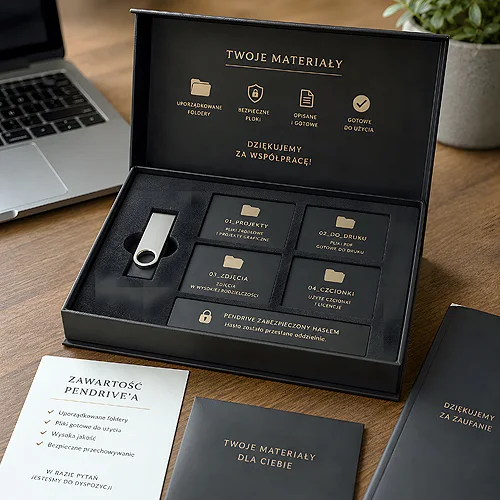
You hand a client a small USB drive and they get your whole offer in their hand - the catalogue, video from the production floor, price lists, presentations and files to download. Sounds like a handy shortcut instead of a thick folder of papers? Sometimes it really is. But not always. Let's look at when a product catalogue on a USB drive genuinely makes sense, and when it's better to reach for classic print.
- A USB drive shines with large, frequently changing offers - updating a file is cheaper than a reprint.
- It is a great carrier for multimedia: video, presentations, price lists and downloadable files.
- It works brilliantly in B2B sales, with field sales reps, and at trade fairs and conferences.
- Personalisation - a logo on the casing and packaging - builds a professional impression.
- A printed catalogue still wins where a quick browse and no need for equipment matter most.
When a USB drive truly delivers
A USB drive is not a magic answer to everything, but in a handful of situations it can work wonders. It is most visible where the offer is large, lives its own life and needs something more than a static photo on paper.
Very large and frequently updated catalogues
If your offer runs to hundreds of items and changes every season, reprinting a paper catalogue can be a chore. On a USB drive you simply swap the PDF file - and the full set of data is up to date again. It is a convenient solution for companies that do not want to keep ordering new print runs, yet still need to show the whole range.
Multimedia in one place
Paper shows a photo. A USB drive shows a film. On a flash drive you can easily fit video presenting the product in action, an animated presentation, a detailed price list or ready-to-download files - specifications, manuals, document templates. For the client it is a complete set in their pocket, and for you a way to tell more than fits on a single brochure page.
With every catalogue on a USB drive it is worth including a short start file - for example a clear menu as an HTML page or a single PDF page - that guides the recipient through the contents. That way nobody gets lost in the folders.
B2B sales and work in the field
In business-to-business trade the conversation often happens at a table, at a laptop, during a short meeting. A sales rep who pulls out a USB drive with the full offer stays in control - they can show exactly what interests the client and leave the complete materials for later.
It is also a handy logistics tool. Instead of hauling kilos of catalogues, the rep carries a handful of flash drives. Each client gets the same, up-to-date set, and you can be sure nobody is handing out an offer from two seasons ago. If you are building a coherent set of materials for the sales team, it pairs well with classic printed brochures and catalogues, which act as a quick calling card.
Trade fairs, conferences and first impressions
At a trade fair everyone is fighting for attention. A leaflet lands in a bag with twenty others and often does not come out alive. A USB drive is a different league - something the recipient tucks into their pocket because it will come in useful, and takes your offer along with it.
You hand over a complete set of materials in a small, elegant carrier and make a professional impression straight away. If you are planning a presence at events, it is worth thinking through the whole handout mechanic - we wrote about it in more detail in our piece on how to use a promotional USB drive at trade fairs and conferences. A popular choice for such occasions is the classic Twister USB drive with a printed logo, which looks good and is easy to hand out.
A well-prepared USB drive is not a gadget that ends up in a drawer - it is a carrier that makes your offer go back to the office together with the client.
What to put on the drive and how to arrange the files
The carrier is only as good as its contents. Chaos in the folders can spoil even the best offer, so it is worth planning the layout before you load anything onto the memory.
- Main catalogue - the full offer as a PDF, ready to browse and print.
- Video and presentations - materials that show the product in motion and explain what is hard to describe in words.
- Price lists and specifications - in a separate, clearly named folder, easy to swap when updating.
- Downloadable files - document templates, manuals, technical data, a logo for the client to use.
- Contact - one file with company details, the website address and the simplest way to place an order.
Name the folders in plain language, avoid shortcuts only you understand, and keep the structure shallow - the fewer clicks, the better. The recipient should find what they are looking for in a few seconds.
Personalisation that builds the brand
A logo printed on the casing means the USB drive stops being an anonymous gadget and becomes part of your brand. Add to that the packaging - a box, a case or a sleeve - which lifts the whole thing a level higher and makes handing over the carrier feel like giving a gift rather than passing out leaflets. The drive itself is worth matching to the recipient: the Colour holds brand colours thanks to UV print, while the metal Unity with engraving suits a premium conversation better.
Make sure the graphics on the casing and packaging speak the same language as the rest of your materials - the same colours and logo as the catalogue or business card. Consistency signals a company that has everything buttoned up.
When plain print is better
Let's be honest - a USB drive will not replace paper in every situation. There are moments when a printed catalogue or brochure wins, and there is no point pretending otherwise.
Paper allows a quick browse - you flip through, come back, mark it with a pencil, and you need no equipment for any of it. Not every recipient has a laptop to hand, and not everyone is keen to plug an unfamiliar USB drive into a work computer. Print works instantly, for everyone and everywhere.
There is also the matter of impression. A well-produced catalogue on decent paper stays on the desk, catches the eye and reminds people of the brand every time they glance at it. That is a durability a file on a USB drive cannot match. That is why the best results often come from combining both worlds - an elegant brochure for a good first contact and a USB drive with a full set of materials for a deeper conversation.
How to choose well
Before you decide, ask yourself a few questions: how large is the offer, how often does it change, who are you handing it to and in what situation. If it is about extensive, living multimedia materials for B2B clients or trade fair visitors - a USB drive is a bullseye. If a quick browse and a desk-side impression matter most - go for print. Most often the smartest move is to combine the two.
We are happy to help you match the solution to your needs. Take a look at our range of personalised USB drives or drop us a line - we will suggest what works best in your industry.