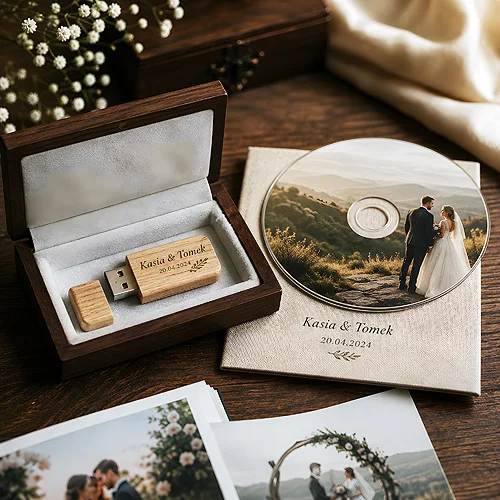
In a world where everything is sent by link, a physical disc with your portfolio can leave a stronger impression than yet another file in the cloud. The client gets something they can hold, put on the desk and show to someone else. It is a gesture that says more than an email with an attachment - that someone cared about how their work reaches the recipient. In this post we show when such a carrier makes sense and how to prepare it so it looks professional from the very first second.
- A physical disc is tangible and stays with the recipient longer than a link that is easy to lose.
- It suits photographers, musicians, agencies, companies handing over materials and archives.
- A disc can be branded: print on the surface, packaging and insert all play one tune.
- A set with a digipak or an envelope turns a plain file into a complete, considered product.
Why a physical carrier still makes sense
It might seem that a disc is a relic - after all, everything can be sent over the internet. And yet in many situations a physical carrier wins on the very thing a file lacks: presence. A link disappears in the inbox among dozens of other messages, while a disc stays on the desk and reminds people of itself every time they glance at it.
There is also an element of a gift in it. A nicely packed disc with materials is not just data - it is the act of handing something over, and that builds a relationship. The recipient feels they received something prepared just for them, not a mass-sent attachment. Such a small thing can set apart a company that cares about detail from one that does everything the lazy way.
There is also the matter of completeness. A disc together with its packaging and insert forms a closed whole - the material, its frame and information about the sender in one place. This works especially where handing something over is meant to have weight: delivering a finished project, presenting an album or passing on a company archive.
A link can be missed in the inbox. A disc on the desk cannot be overlooked.
Who this carrier suits
A disc is not a solution for everyone, but in a few industries it still plays a concrete role. It is worth seeing where it works best and why.
Photographers and videographers
A wedding session, a reportage or product shots handed over on a disc in elegant packaging are a completely different experience than a link to a gallery. The client gets a ready set they can keep as a memento. For the photographer it is also a brand carrier - their logo stays with the client long after the job ends.
Musicians and audio creators
A physical album still holds a value for fans that a file cannot replace. A disc with original cover art, sold at a concert or shipped in a presale, builds a bond with the audience and rounds off the artistic whole of the project.
Agencies and companies handing over materials
An agency portfolio, an offer presentation, a set of training materials or project documentation - all of it gains when it reaches the client in a consistently branded form. A disc in company packaging looks more serious than a download link and underlines that the company takes the handover seriously.
Archives and long-term documentation
Where the point is to store data durably for later - project backups, documentation, archive materials - a physical disc is sometimes a deliberate choice: it sits on a shelf, it is labelled and it is independent of anyone else's servers.
Before you pick a carrier, estimate the size of your material. An ordinary CD will hold photos and documents, but for longer high-quality video reach for a more capacious DVD - otherwise the whole set will not fit.
CD or DVD - matching the carrier to the content
The choice between a CD and a DVD comes down mainly to how much material goes onto the disc and what kind it is. Both look similar on the outside and both can be branded with the same care, but they differ in capacity, and that translates directly into what fits on them.
A CD is enough in most situations where you hand over photos at a reasonable resolution, documents, presentations or audio files. It is a light, cheap carrier that works perfectly for a photo portfolio or a set of corporate materials. A DVD has far greater capacity, so you reach for it where longer high-quality video or a truly extensive file archive is involved.
It is worth thinking this choice through at the start, before you design the graphics - because capacity decides not only what fits, but also how you organise the content. Better to estimate the size of the material well once than to discover at the last moment that the whole set does not fit on the chosen carrier.
Branding - the disc, packaging and insert
The greatest strength of a physical carrier is that every part of it can be branded. It is not just about the data on the disc, but the whole experience the recipient gets. Three layers create that impression.
The first is the disc itself. Print on the surface of the disc turns a raw carrier into an element of identity - logo, title, graphic theme. We write in more detail about how to technically prepare such a print in our post on printing on CDs and DVDs. It is worth reading before you send the artwork to print.
The second layer is the packaging. It makes the first impression before anyone even reaches for the disc. It should protect the disc and carry the brand at the same time - colour, logo, a style consistent with the rest of the company's materials. Well-chosen discs and packaging make the set look like a considered product, not a last-minute improvisation.
The third is the insert - a card or small booklet with information about the contents, a list of materials or a short note from the sender. It is the detail that organises the set and gives the recipient context. All three layers should play one tune: the same colours, the same typeface, the same version of the logo. The insert is matched to the amount of material - in our booklets and inserts it starts at 2 pages, and the stitched version reaches 36.
How to pair the disc with packaging
The disc alone is only half the success - it is completed by packaging chosen to match the character of the material and how the set is meant to be received. Two solutions work especially often.
Digipak - a premium frame
A digipak is a card sleeve in which the disc is set into a tray and the whole thing opens like a small book. It gives plenty of room for graphics and feels like a solid, refined product. It works where a premium effect matters - with music albums, photo portfolios or a presentation for an important client. You will find more about this form in the digipak section.
Envelope - a simple, practical form
When the set is meant to go by post or be handed out in larger numbers, a simple printed cardboard disc envelope works well. It is light, cheap to ship and still leaves room for a logo and basic information. It is a good choice wherever practicality matters and yet you do not want to give up branding.
Match the form of packaging to the situation in which the disc reaches the recipient. Something handed over in person can go in an eye-catching digipak, while material sent in bulk suits a lighter envelope that is cheaper and easier to post.
Preparing the materials and the artwork
A well-prepared design is the condition for the result on the disc and packaging to match what you see on screen. A few rules make sure nothing surprises you after print.
- Separate files for each element - a different design for the disc, the packaging and the insert. Each has its own format and print area.
- CMYK colours - the project in print mode, not screen RGB, so the colours do not shift after printing.
- Bleed and safe area - graphics extended beyond the cutting line and important elements kept away from the edge so nothing gets trimmed.
- Resolution - graphics in print-ready quality, not a low preview version from the internet.
It is also worth tidying up the data itself that goes onto the disc in advance: clear file names, logical folders, perhaps a short file describing the contents. A recipient who knows straight away where everything is after inserting the disc thinks better of your company than one who wanders through a chaotic folder.
A physical carrier is not a step back but a conscious choice where tangibility and careful finishing make a difference. A well-branded disc with considered packaging stays with the recipient and works for your image long after a plain link would have vanished in the inbox. If you want to match the carrier and its frame to your material, get in touch - we will suggest what works best and how to prepare the files for print.