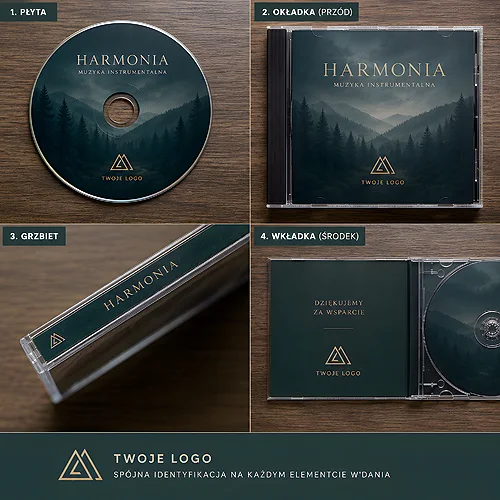
With a disc release the first question is usually which case to use. The choice is simpler than it looks, because it comes down to a single property: thickness. Almost every other decision follows from that one automatically.
There are two classic plastic cases to choose between. CD-BOX, the jewel case, is around 10.4 mm thick and is the distribution standard for a single CD or DVD. SLIM measures 5.2 mm, roughly half of that, and is about three times slimmer than a full-size case.
That difference feeds into two things at once: how much print will fit inside and how much the parcel weighs. Below we take it apart piece by piece.
- CD-BOX is the jewel case, around 10.4 mm thick, with a clear tray.
- The CD-BOX rear inlay has spines, so the title shows when the disc stands on its edge. SLIM has nothing of the kind.
- SLIM measures 5.2 mm and has a black base; it takes a 120 mm disc with a cover or a sewn booklet.
- Into a CD-BOX you can put a 4 or 6 page inlay, or a sewn booklet of 8 to 28 pages.
- We put the discs and booklets into the cases ourselves - you receive a set ready to sell.
Spines, the one argument SLIM does not have
The jewel case was created as retail packaging, and its whole construction follows from that. The key detail is the rear inlay with spines: two narrow wings folded along the sides, onto which the title is printed.
Thanks to them a disc standing on its edge in a rack, in a drawer or on a shop shelf can be recognised without being pulled out. That is the one advantage SLIM does not have and cannot have, because it is simply too thin for anything to be legible along its edge.
There is little room on the spines, so the same rule applies as on any narrow panel: the title and the artist, or the name of the series, and nothing more. The catalogue number and the label logo belong on the rear inlay. A narrow, legible typeface pays off, because a spine is read from above, at an angle, in the poor light of a rack.
So if your release is going to stand on a shelf, in a shop, in a library or in somebody's collection alongside others, the spines tip the balance. You will find them in the CD-BOX with covers version.
When SLIM wins
SLIM is not a worse case, only a case for a different situation. It wins wherever the disc is not standing on a shelf but travelling somewhere or being added to something else.
- Posting - it is lighter and flat, so it fits where a jewel case no longer does.
- Training material - a set of a dozen discs takes up half the space in a binder or folder in the SLIM version.
- A disc added to a set - into a product box, a presentation folder or a welcome pack.
- A large run to give away - at a conference, at a trade fair, at a reception desk. Here the bulk of the parcel matters, not visibility on a shelf.
SLIM has a black base and takes one CD or DVD of 120 mm diameter plus a cover or a sewn booklet. The details are on the SLIM cases with covers page. On a larger run the difference in thickness multiplies by the number of copies, and it only really shows on a pallet or inside a shipping carton.
The clear tray and what follows from it
In a CD-BOX we work with one version of the case, the one with a clear tray, the moulded part the disc sits in. It is a small piece of construction, yet it changes the look of the whole thing more than the name suggests.
A clear tray lets light through, so the artwork of the rear inlay shows through both the disc and the tray. For a designer that is an extra surface to work with: the background of the inlay becomes part of how the case looks. It does demand, though, that the artwork still reads well seen through plastic and through the hole in the middle of the disc.
A black base is what SLIM offers instead: it gives an even, quiet background against which the disc looks more serious and more contrasty. It suits releases that are sparing with artwork and company material in general.
Since the tray is clear, look at the rear inlay artwork without the track listing. That is what usually occupies the middle, and the middle is exactly what the disc covers. Move the important elements outside the outline of the disc, roughly towards the bottom edge and towards the spines.
How much print will fit
This is where the difference between the cases becomes most practical.
CD-BOX
In the version with covers you get a printed cover and a rear inlay with spines. Instead of a single cover you can slip in a 4 or 6 page inlay or a sewn booklet of 8 to 28 pages. The latter earns its place on a music release with lyrics and photographs, or on training material with instructions, a list of modules and space for notes.
SLIM
SLIM takes a cover or a sewn booklet, with no rear inlay, because there is nowhere to put one. It is the case for a release where the content lives on the disc and the paper only has to say what this is and who it is from.
The booklets and inlays themselves are ordered separately: from 2 to 36 pages (a 2, 4 or 6 page insert, and a stitched booklet going up in fours: 8, 12, 16 and so on to 36), printed in CMYK, meaning the four basic printing inks. You will find the details with our booklets and inlays.
We assemble the set
One thing sets this order apart from ordinary printing: we put the discs and booklets into the cases ourselves. You receive a set ready to sell or to hand out, without an evening spent at a table with cases and shrink film.
For the person ordering, one more thing follows from that: it is worth settling the case before you finish the artwork, because the case decides how many printed pages you are preparing. Discs also follow the proof route here, which means a new design is approved on a proof before production. The order of decisions that keeps it all tidy:
- Work out where the disc will end up - on a shop shelf, or in an envelope and a folder.
- Choose the case - the thicker one with spines, or the slimmer one for posting.
- Decide on the number of pages - a cover, an inlay or a sewn booklet.
- Remember that the CD-BOX tray is clear and take that into account when you design the rear inlay.
- Approve the proof before production begins.
When cardboard is worth a look
A plastic case is not the only route. Cardboard releases, meaning digipacks and ecopacks, have a completely different character: warmer to the touch, closer to a book than to a case, and a better fit for brands that talk about an ecological approach. You will find a comparison in our post on a digipack or a CD envelope, and for occasion releases it is worth reading our piece on packaging for wedding discs. The whole category is waiting in the CD discs section.
Choosing between CD-BOX and SLIM is not a choice between better and worse. It is a question about where the disc will spend the rest of its life: standing on its edge on a shelf, or travelling in an envelope. Answer that first and the rest, meaning the number of pages and the paper, arranges itself. On tying the disc and its packaging into one visual whole we wrote in our piece on designing a CD with brand identity.