An order from the table by the window, two changes to a dish, one allergy and a question about splitting the bill three ways. Between taking an order and handing over the bill, more happens on the floor than the guest ever sees - and much of it lives, for a while, only inside the waiter's head. A waiter's notepad exists to move that out of the head and onto paper.
It is one of those objects nobody thinks about as long as they work. A pad in an apron pocket does not look like a tool that changes anything about how a venue is run, and yet it decides whether an order reaches the kitchen complete.
Printed waiter's notepads are practical pads for taking orders in a restaurant, a cafe, a bar or a hotel. In the calculator you choose the format, the paper, the printing and the number of sheets - and every one of those four decisions translates into how the pad performs on the floor.
- A waiter's notepad is a working tool, not a giveaway - you judge it by how fast you can write on it under pressure.
- Printed fields do more than graphics: table number, number of guests, time, notes.
- Match the format to the apron pocket - a pad that does not fit ends up left on the bar.
- The number of sheets should follow the rhythm of the venue, not the urge to build up stock.
- Printing your logo makes sense, because the sheet regularly ends up in front of the guest.
- In a hotel the same product works at reception and for room service, only with a different grid of fields.
Why paper still beats a screen
In many venues a tablet-based system works perfectly well and nobody intends to give it up. There are situations, though, where a plain pad is simply faster and less prone to failure. A notepad never runs out of battery, and the wi-fi signal in a garden under a parasol can be a matter of weather.
There is also something easy to forget: a screen pulls attention away from the guest. A waiter tapping at a tablet is looking at the device. A waiter with a pad keeps glancing up, because writing by hand does not demand the same concentration as hunting for an item in an on-screen menu. In a venue that sells atmosphere, that is not a trivial detail.
Then there is the barrier to entry. A new person on shift can handle a sheet of paper from the first minute - nothing has to be demonstrated and no account set up. With the high staff turnover typical of the season, that is a real saving in nerves. In practice a mixed setup usually wins: the system at the till and the pad out on the floor.
What belongs on the sheet
A blank sheet looks universal, and in practice it is the worst possible solution. Under pressure nobody writes neatly and nobody remembers to add the time. The sheet has to prompt for what is missing.
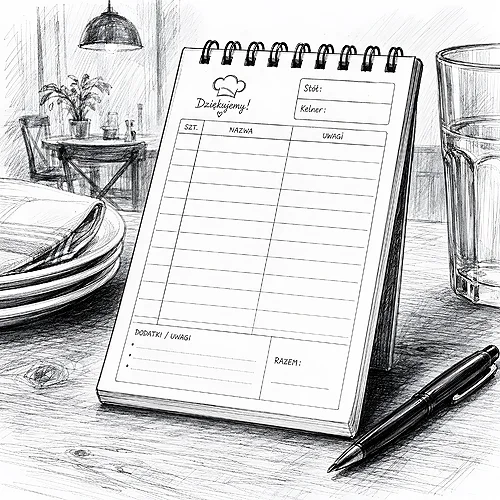
- Table number - a field right at the top, clearly marked, ideally in a box. It is the one piece of information whose absence invalidates everything else.
- Number of guests - needed by the kitchen when plating, and at the bill it saves the situation when one table splits into two payments.
- Time the order was taken - the basis for answering a guest who asks how much longer the wait will be.
- Space for notes - allergies, a swapped side, sauce on the side. This is where most complaints are born, so the field has to be generous.
- Initials of the person taking the order - a small thing that lets you reconstruct the evening afterwards without guesswork.
Printed fields instead of open space
A grid of fields works like a checklist. The waiter does not have to remember to note the number of guests - an empty box is there and gets filled in. The same principle governs forms in every trade where speed matters: the fewer decisions to make, the fewer mistakes.
It is worth keeping the proportions on the sensible side, though. A grid that is too dense forces tiny handwriting, and tiny handwriting can be unreadable in the kitchen. Better to have fewer fields, but ones where a few words fit legibly.
Before you order a print run, print a single sheet on an office printer and put it through one real evening. After a single shift you can see at once which field is too small and which one nobody uses. A correction at this stage costs five minutes; after the whole run is printed, it costs the whole run.
Format and sheet count, or fitting the pad to the venue
Format is the most frequently skipped decision. A pad is chosen while looking at a design on screen, and used while being pulled one-handed out of an apron pocket. If the pad is a centimetre too wide, within two days it is lying on the bar and nobody carries it.
Measure the pocket where the pad is meant to live, and only then pick the format in the calculator. Check as well whether you can write on it while holding it in your palm, without resting it on a table. A narrow, tall pad usually beats a wider one: it simply sits better in the hand.
The number of sheets is not a question about stock levels, it is a question about the rhythm of work. A thin pad runs out quickly, but it is light and comfortable in a pocket. A thick one lasts a long time, yet towards the end of its life it becomes unwieldy.
A simple way to estimate: count how many orders go through a shift in your venue and multiply that by the number of days after which you want a fresh pad. If you would rather every waiter started a shift with a clean notepad, choose a thinner version and a larger print run.
The printing the guest actually sees
A waiter's notepad tends to be treated as a purely internal print, which is why it is often ordered blank. That is an oversight, because the sheet regularly ends up in front of the guest: when an order is confirmed, when a bill is split, when a phone number for a reservation is written down. For a moment it is part of the room, just like a placemat or a menu card. If the room is to look coherent, keep paper placemats in the same design family.
The printing does not have to be elaborate. A logo, the name of the venue and possibly a web address are enough - the rest of the surface should work for the legibility of the fields. If your venue has a consistent visual identity, keep the pad in the same family as the other printed items on the floor; we wrote about holding that consistency together when discussing menu inserts with a seasonal offer.
In a hotel it is a different tool
In accommodation the same product works in two places at once, and each needs a different grid of fields. For room service the room number, the delivery time and the guest's signature are what matter. At reception you need space for a surname, a time and a short note to pass on to the next shift.
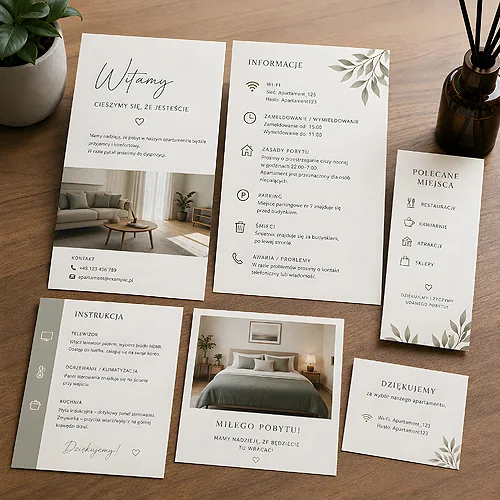
That is why in a hotel two designs ordered together, in one job, tend to work better than a single universal pad - the printing stays the same, the layout of fields changes. The rest of the small printed items a guest is handed are planned the same way, which we cover in our post on the hotel welcome pack.
How to order and get it right first time
- Start from the flow of an order - write down what a waiter has to note from approaching the table to handing over the bill. That is your list of fields.
- Measure the pocket - and only with that dimension choose the format.
- Decide on the sheet count - count the orders per shift and pick the rhythm for replacing the pad.
- Design the fields before the graphics - function first, logo and colours second.
- Test a single sheet on the floor - one evening is enough to catch the mistakes.
A waiter's notepad will not turn anyone into a better waiter. It does something more modest and more useful: it takes off your mind things that were never worth keeping there. Look for the rest of the printed items that keep the floor in order in the HoReCa category or among the pads and blocks.