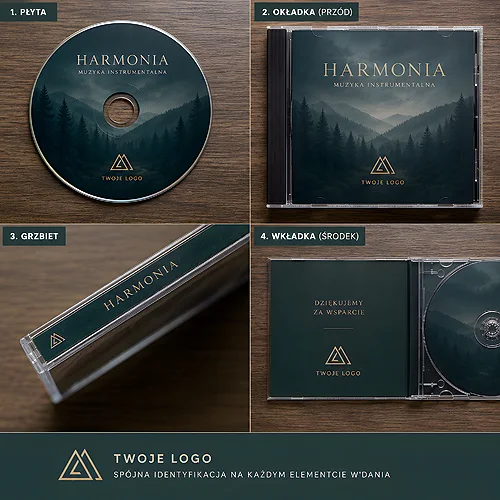
You order a branded USB drive, print a solid logo on it - a good move. But there is one more element that is easy to forget and that decides the first impression: the packaging. The USB drive itself is just a data carrier. It is the packaging that turns a small gadget into a gift, protects it on the way to the recipient and shows that your company cares about detail. Below we show how to design that packaging - from a minimal envelope to an elegant box for a special occasion.
- Packaging makes the first impression, protects the drive in transit and raises the perceived value of the whole set.
- The form depends on the occasion: a simple envelope or blister for everyday use, a box or digipack for a premium gift.
- It is worth placing a logo, a short slogan, a QR code and a brief note about the contents on the packaging.
- Finishing (matte film, gloss film, velvet Soft Touch film) and consistency with the rest of your materials make a huge difference.
Why a USB drive needs packaging
You can hand over a bare drive and it will work. But packaging solves several things at once, and you notice none of them until it is missing.
- First impression. The recipient judges the gift before they use it. Neat packaging immediately sets the tone - this is not just another giveaway, but something prepared with them in mind.
- Protection. A drive travels by post, lands in a bag at a trade fair, passes through many hands. A rigid box or sleeve protects the connector and body from knocks and scratches.
- Perceived value. Unpacking is a small ritual. As the recipient lifts a lid or slides open a sleeve, for a moment they focus only on your brand. A bare carrier does not give you that.
- Consistent image. Packaging in the same colours and with the same logo as the rest of your materials shows that the company is organised and thinks about detail.
Types of packaging - from minimal to premium
Not every situation calls for an elegant box. Match the form to the occasion, the quantity and the way the drive reaches the recipient.
Envelope or blister - the minimal option
A simple printed envelope or a transparent blister is an everyday solution: for bulk mailing, conference materials or a welcome pack for new employees. Cheap in logistics, light, and you can still place a logo and a short note on them.
Sleeve - compact and neat
A sleeve - cardboard, board or plastic - holds the drive in place and protects the connector. It looks good in the hand, fits into a courier envelope and works well when you want something nicer than a blister but without a full box.
Digipack and cardboard box - the gift option
When the drive is meant to be a gift, reach for a rigid box or a digipack. A folding form with a slot for the carrier looks like a small publication: a full surface for print, room for a slogan, a photo and information. It belongs to the family of elegant cardboard sleeves that work when you want a premium effect. If you are still choosing the carrier itself for such a set, start with a branded USB drive and match the packaging to it.
Packaging does not have to be expensive to do its job. It has to fit the occasion and look like part of a thought-through whole, not a stuck-on extra.
What to put on the packaging
The surface of the packaging is an advert working in the recipient's hands. Do not cram it - choose a few elements that truly add something.
- Logo. The basics. Legible, at a safe distance from the edge, in a version matched to the background colour.
- Short slogan. One sentence or a brand claim. It should set the mood, not explain everything.
- QR code. Leads to a website, downloadable materials or instructions. It turns packaging into a bridge to online content.
- Brief note about the contents. A short line on what is inside - especially when the drive holds specific materials, a catalogue or a presentation.
Plan the QR code as a fixed element, not an ornament. Leave a clear margin around it and check the contrast so a phone reads it on the first try, including on a matte finish.
Finishing and texture - how they lift the impression
The way the packaging feels in the hand affects the recipient before they read anything. Texture and finishing are the cheapest way to make the whole thing feel more valuable.
- Matte. Elegant, understated, does not reflect light. Works well with a minimalist logo.
- Gloss. Boosts the colours and adds energy - suits vivid, bold designs.
- Soft touch. A velvety, pleasant finish that instantly signals a premium version.
- Spot varnish. A glossy accent on a matte background - available here only on the digipack 4P and 6P, but that is exactly where it makes the strongest impression.
Matching the model and the rest of your materials
The packaging holds a specific drive, so design it around its shape and size. Models from the same family share a character but differ in form - it is worth designing the cutter or insert so the carrier sits firmly and does not rattle inside. If the packaging is to be flat and fit into an envelope or a wallet, the PCC in credit card format is worth considering - the cutter then becomes simple, because the carrier is as flat as a card.
The second thing is consistency. The colours, font and logo on the packaging should play with the rest of your materials - business cards, catalogue, folder. When everything belongs to one visual system, the drive with its packaging looks like part of a larger, considered whole. On making the content of the drive itself just as polished, we wrote in the piece on how to design USB drive content so the recipient wants to open it.
When to keep it simple and when to go premium
There is no single right answer - there is a fit to the situation. Simple when scale and logistics matter. Premium when the gesture and the individual recipient matter.
- Simple version: bulk mailing, handing out at a stand, materials for a conference folder. An envelope or blister is plenty.
- Premium version: a gift for a VIP client, a welcome pack for a key employee, a trade-fair keepsake for selected guests. Here a box or digipack with a solid finish really pays off.
If you want to compare which form best fits your case, see our overview of a box, a sleeve or a card with a drive - packaging compared. And when you have a ready idea for a set and want to finalise it with us, get in touch - we will help match the packaging to the model and the occasion.