A CD at a concert or in a package sent to the radio remains one of the most tangible ways to leave a mark. However, before it reaches the listener's hands, several decisions must be made: how to package it, how to design the cover, and how many copies to order to keep it financially viable.
- Media format: paper envelope for a quick demo, digipack for concert material, pressing only for larger print runs.
- Graphic file: bleed 3-5 mm, CMYK, minimum 300 dpi, fonts converted to outlines.
- Small print run: CD-R copying is cost-effective up to 1000 copies, above that threshold pressing with a matrix is better.
- Distribution: concerts, music editorial offices, and small online stores are three channels that work together, not separately.
Choosing the media format: CD, digipack, or paper envelope
Before the band starts looking for a graphic designer, it's worth answering one question: what is this CD actually for? The packaging differs for a demo given out after a concert compared to a CD that is meant to sit on the shelf in a music store alongside other releases.
A paper or plastic envelope is the cheapest and fastest solution. It works well for promotional inserts, singles distributed to fans, or materials sent to music journalists, where speed matters more than the wow effect. In the offer, you can find paper envelopes for CDs and DVDs which offer a bit more rigidity than a classic plastic envelope and handle postal transport better.
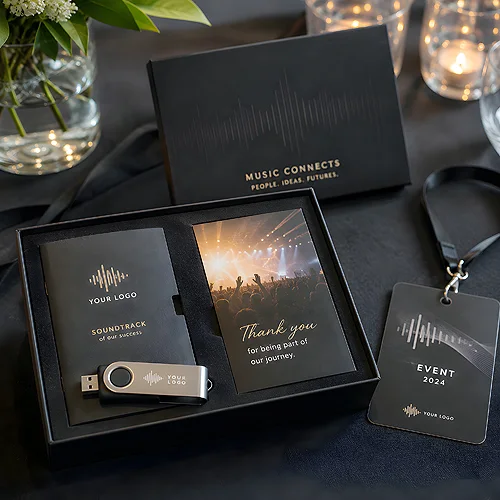
The digipack is a different league altogether. A cardboard case with a slot for the disc and space for a booklet looks serious and is associated with a full-fledged release, not just a demo. For a single or a mini-album, a simple 4P digipack for one disc can work, while for extended material with several media types, such as a concert recording and music videos on a separate disc, a better option would be the 8P three-panel digipack for three discs. With a print run of 100 copies, such a three-panel digipack with full-color print on Arktika 300 g cardboard and finishing with foil is priced at 690 zł net, which is quite reasonable when comparing the cost and visual effect.
The discs themselves also have technical limitations that are easy to forget during design. A standard 12 cm disc can hold up to 700 MB of data, which is about 80 minutes of recording, enough for a full album. A mini CD with a diameter of 8 cm holds only 200 MB and about 21 minutes, so it's better suited as a carrier for a single or promotional material for the press, rather than a full album.
It is also worth mentioning that many bands search for phrases like cd printing or paper sleeves for cds in search engines, as artists worldwide ask themselves the same question: how to print a disc and package it to look professional, not amateurish.
Designing the cover and insert: technical requirements for the file
Graphics for a digipack or envelope operate under different rules than a poster or leaflet. The disc is small, the recipient views it up close, so every detail, font, contrast, photo quality immediately stands out.
The basic technical requirements for the file are as follows:
- Minimum resolution of 300 dpi at 1:1 scale, without scaling at the last minute.
- Color space CMYK, not RGB, otherwise colors will look different when printed compared to what’s on the screen.
- Bleed of 3-5 mm on each side, so the background does not cut off right at the edge.
- Fonts converted to outlines or included as separate files.
- Design in a PDF file with flattened layers for printing.
The subject of contrast deserves a separate paragraph as it is one of the most common mistakes. Bands playing heavier genres often choose a black background with details in bright colors, which looks great until someone tries to read text in dark gray on black. The rules of good contrast and designing on a dark background, which we described regarding designing merchandise on a black background, apply perfectly to CD covers as well.
If you don't have a graphic designer in the band, commissioning the cover and insert design to someone who regularly prepares files for printing will save you nerves later during revisions. The full range of requirements, including examples of correctly prepared files, can be found in the section how to prepare files for printing.
The booklet for the digipack is a separate topic. Lyrics, acknowledgments, session photos, all of this must fit within the insert format and remain readable even after folding. Ready templates and booklets and inserts for digipacks help maintain proven proportions instead of designing from scratch.
If the band does not have its own graphic designer or wants to ensure that the project meets production requirements, it is advisable to use a ready-made service for graphic designs for covers, digipacks, and CDs, where the dimensions and bleeds are already adjusted to the specific package format.
Personalization and small print run: how to order without high costs
This is where the most practical part of the whole process begins, as it’s the print run size that decides how much the band pays per piece and what technology can be considered.
Pressing CDs with prints requires creating a dedicated matrix, so the minimum print run in this technology is 500 copies. With that print run, the unit price is around 1.78 zł net each, and with 1000 copies it drops to about 1.30 zł, and only at 5000 copies does it become really attractive, going down to about 0.90 zł net per unit. In other words, pressing is worth it when the band plans for a real distribution, not just sending demo packages to friends.
For smaller quantities, copying on CD-Rs is more reasonable than pressing since it does not require a matrix and is cost-effective up to a print run of 1000 copies. Above that threshold, the roles reverse, and pressing becomes more cost-effective. If the band wants to order just a few dozen copies, for example for a single concert or a specific promotional event, it’s worth considering a package of 50 4P digipacks in an economic version, which costs around 225 zł net, about 4.50 zł per piece including packaging. In comparison, the digital UV printing on a disc in a package of 100 copies costs around 200 zł net, which is a cheaper alternative to pressing for really small promotional runs.
There are even more minimalist solutions. A two-panel digipack when copied on CD-R instead of pressed can be ordered from just 10 copies, which in practice means that the band can print exactly as many copies as needed for one specific event without leftover stock of unsold discs.
Personalization, which means placing a different serial number, dedicated signature, or unique graphic element on each disc, makes sense mainly for limited editions for the most loyal fans. For most promotional runs, a single, repeatable design is enough because variable data increases costs and production time, and for a run counted in dozens of copies, it is rarely worth it.
The upper limit to keep in mind when planning a larger concert tour is usually 3000 to 5000 copies in one order, depending on the chosen product from the CD/DVD section and packaging. Above this threshold, it’s more sensible to split the order into several batches over time rather than freezing the budget in one large delivery.
Distribution of the promotional disc: concerts, press, online stores
A printed disc won't sell itself nor reach the radio. Distribution is a separate stage that is worth planning even before the project goes to print, as where the disc is intended to go affects its format as well.
A concert is the most natural environment for a physical carrier. A stand with merchandise having several copies in a simple paper envelope works great for smaller club tours where price and a quick turnover matter. At larger events, festivals, or tours with larger audiences, a digipack performs much better visually and is easier to price as a product rather than a ticket add-on.
Sending to music editorial offices, radio stations, and bloggers entails a completely different logic. Here, the first impression made in the second after opening the envelope counts because journalists receive dozens of such packages weekly. A careful digipack with clear information about the band on the insert, without the need to search for contact details, increases the chances that the disc will actually make it to the player rather than going straight to a pile to be reviewed later.
An online store and sales platforms are a channel that requires the most visual discipline, as the customer sees the product only in the photo, not holding it in hand before buying. Here, a digipack with a well-lit cover and consistent visual identity of the whole release sells noticeably better than a simple envelope, even if the production cost difference is slight.
It's also worth thinking of the disc as part of a larger campaign, not just a single gadget. If the band plans a staggered distribution, for example releasing it first at concerts and only later in the store, it’s good to map out the production schedule similarly to seasonal corporate materials, where early ordering decides whether everything will arrive on time, as we've described when planning ordering corporate materials in advance, where the completion date also needs to be accounted for in the promotion schedule.
Frequently Asked Questions
How many CDs should be ordered for the first concert tour?
For a debuting band, a reasonable starting point is a print run of 50-100 copies in a digipack or envelope, which allows checking interest without freezing a large budget. With subsequent tours, once sales are confirmed, the order can be increased to take advantage of lower unit prices for larger runs.
Is a digipack more durable than a regular paper envelope for a disc?
Yes, a digipack made of thicker cardboard better protects the disc from scratches and crushing in a backpack or bag than a thin paper or plastic envelope. The price difference is noticeable, but it translates into a better first impression for the recipient.
Is it worth pressing a disc for a small promotional print run?
No, pressing requires making a matrix, and only at larger quantities does the unit price decrease significantly. For runs below 1000 copies, copying on CD-Rs combined with digital printing is usually cheaper.
What files need to be prepared for printing a digipack cover?
A PDF file is needed with a minimum resolution of 300 dpi, in CMYK color space, with a bleed of 3-5 mm and fonts converted to outlines. The exact template with dimensions for a specific format is easiest to obtain directly from the printing house fulfilling the order.